
ShardForms Send a document
ForQA and QC teams at manufacturers
DocumentsCertificates of analysis + goods receipts
Matched byLot number on both
Runs onOne Windows PC at your site
Your first stepSend one document
Pilot startsOnce the invoice is paid

Your quality paperwork already has the data. Stop typing it in again.

ShardForms reads the values off each supplier’s certificate of analysis, pairs it with its goods receipt by lot number, and writes one row per lot to a table you can chart. A certificate whose lot you never received is held, not guessed.

Watch the 2-minute walkthrough of the real app
~1 week
A working demo on your own certificate layout, usually within a week of you sending it.
S$0
No charge for the demo, and nothing to sign up for.
Email it tohello@shardforms.com

Or reply to the email you got from us, with the PDF attached.

Away 22 Oct to 5 Nov. Documents sent in that time get their demo the weekend of 7–8 Nov.

Certificates → records → chart Moisture % · by lot · 3 suppliers
Illustration. Supplier names and values are invented.
Sheet2 of 14
SectionThe problem
Jobs listed3
CostHours, and audit risk

Whichever email brought you here, it was about one of these.

Three jobs that come up in almost every QA team that receives certificates or inspection reports. How each one goes today, what it costs, and what changes.

The jobHow it goes todayWhat it costsWith ShardForms
RetypingCertificates of analysis, mill certs, inspection reportsThe one from your email Someone opens each PDF and types the lot number and every value into a spreadsheet. Tomorrow, the next batch. Hours of QA time each month, and every typo is a number you will defend at the next audit. Each document is read when it lands in the folder, and its values go into the row for that lot.
The six-month trendAudits, supplier reviews, driftThe one from your email An auditor asks how one supplier’s moisture has moved since April. You open two hundred PDFs. Drift stays invisible until a batch fails incoming inspection. Every certificate is already a row, so the chart exists before anyone asks for it.
The broken macroBuilt by someone who has since leftThe one from your email A supplier changed their template, the macro stopped working, and nobody knows how to fix it. The process quietly goes back to typing, and the history stops at the day it broke. Your QA team updates the layout by clicking on the new document. There is no code to inherit.
Sheet3 of 14
SectionTry it
DataInvented sample documents
Time neededAbout a minute

Six documents just landed in a folder. Watch them become rows.

This is how it runs at your desk. Click a file in Explorer to look at it, then drag it into the folder ShardForms watches, in any order. Each one is read, matched to its partner by the number printed on both, and written as one row. Two of them look like a pair and aren’t.

Two-minute walkthrough of the real app

Drag files from Incoming into CoA_GRN_v1, the folder ShardForms watches. Or:

Incoming
Local Disk (C:)QAIncoming
6 items
ShardForms· Reading Supplier certificates
Watching CoA_GRN_v10 files
1Identify
2Read
3Match
4Write
Drop a file anywhere on this window It moves into CoA_GRN_v1, and ShardForms reads it here.
Nothing read yet.
ShardForms· Records
Records · supplier certificates
ShardForms· Charts
Note

Two of these six documents look like they belong together. Read them all and see which.

Every supplier, lot number and value here is invented. Your demo is built on your own document and comes by email. In the app, the folder ShardForms watches is named after the layout it reads, as here.

Sheet4 of 14
SectionThe real app
RecordedOctober 2026
Length1:56

Two minutes in the real app: inspection reports in, one table and a dashboard out.

An FAI cover sheet arrives as a PDF and its CMM results as a spreadsheet. ShardForms pairs each one by report number, asks a person about the one value it wasn’t sure of, and charts every measurement.

Screen recording of the working app, October 2026, with sample part numbers and suppliers. The app’s look is still being finalised, so it differs from this page.

Jump to

Your demo works like this, built on your own layout with copies of your document, at a private link.

Send us one document
Sheet5 of 14
SectionSetting up
ScreensFrom the working app
Set upOnce per layout

Set it up once per document layout. After that, it just runs.

Screens from the working app. One layout means one supplier’s certificate template, or one report format from one machine.

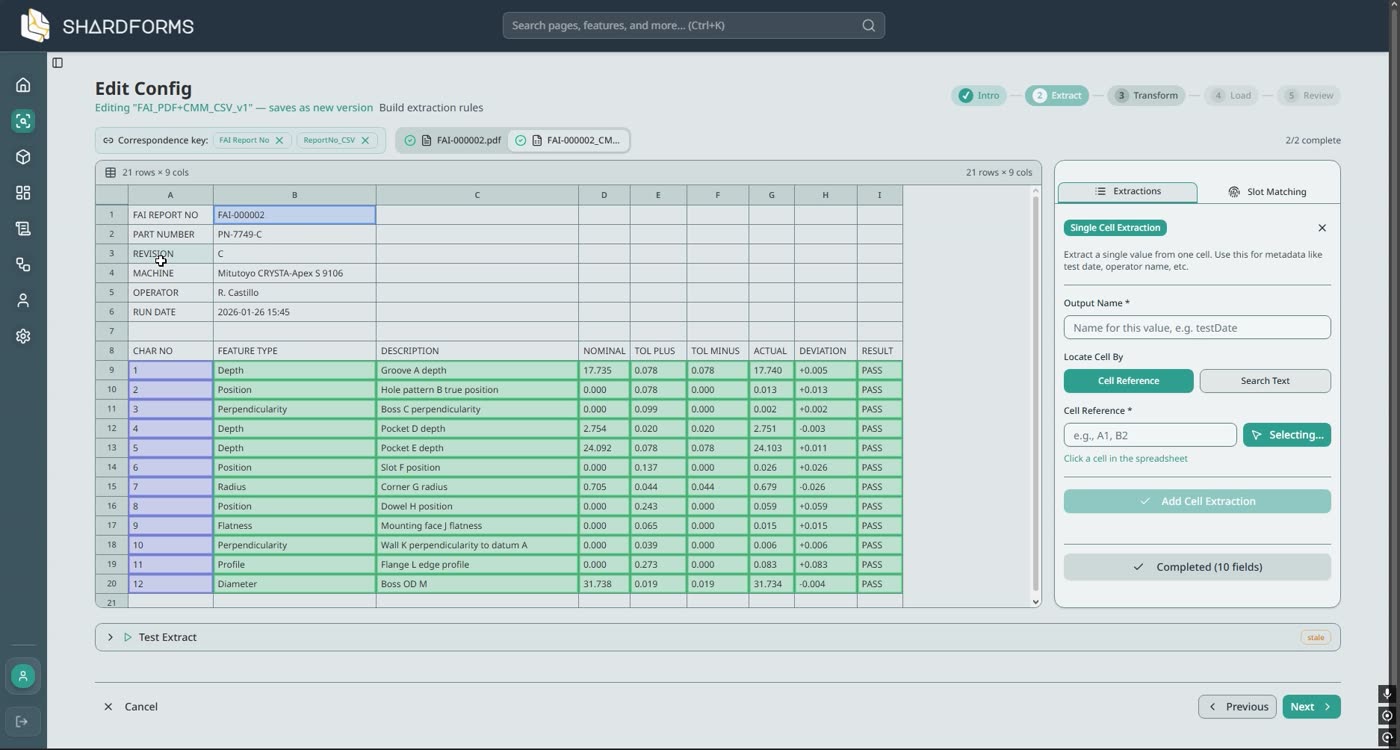
  1. The config editor with an FAI cover sheet open. Labels such as Part number and Drawing number are highlighted next to their values.

    Point at each value once

    Open one sample, click a label, then click its value. No templates to write and no code. The same goes for tables of readings.

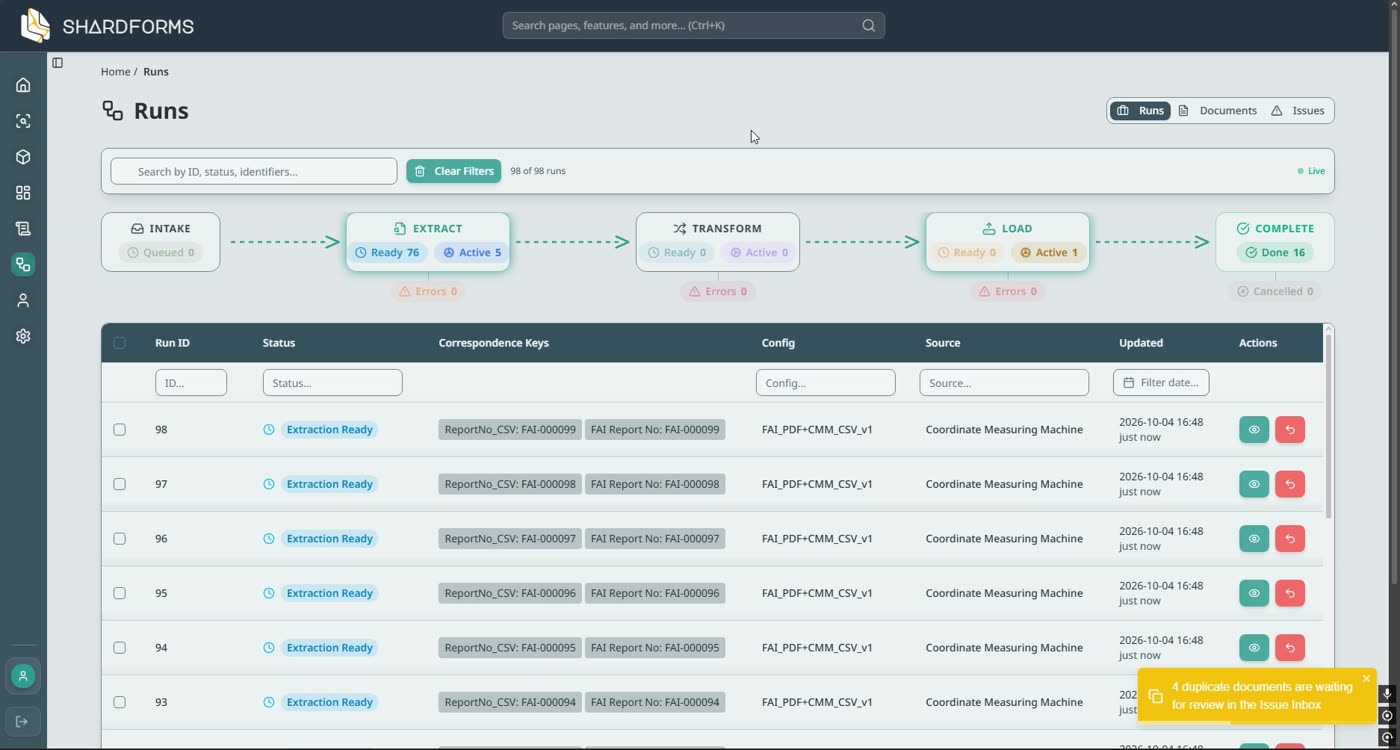
  2. The Runs page. Each run shows two matched keys, such as ReportNo_CSV FAI-000099 and FAI Report No FAI-000099.

    Documents pair themselves by number

    Files are saved into the folder ShardForms watches. Each FAI cover sheet waits for the CMM file with the same report number. A file whose number has no partner is held, never merged into the wrong row.

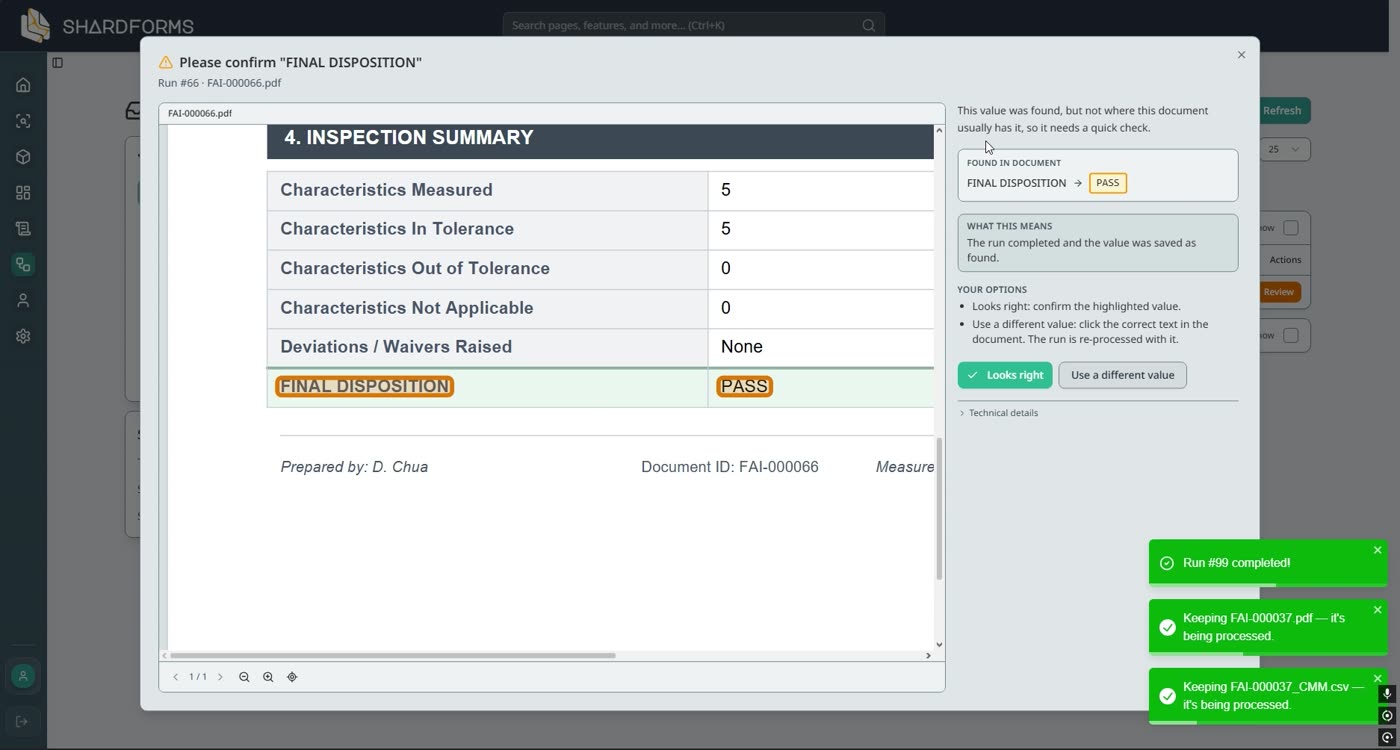
  3. A dialog asking a person to confirm the Final Disposition value read from the inspection summary.

    A person confirms what it wasn’t sure of

    A value it isn’t sure of is saved and listed in the Issues inbox. Someone checks it against the document, then confirms it or types the right one.

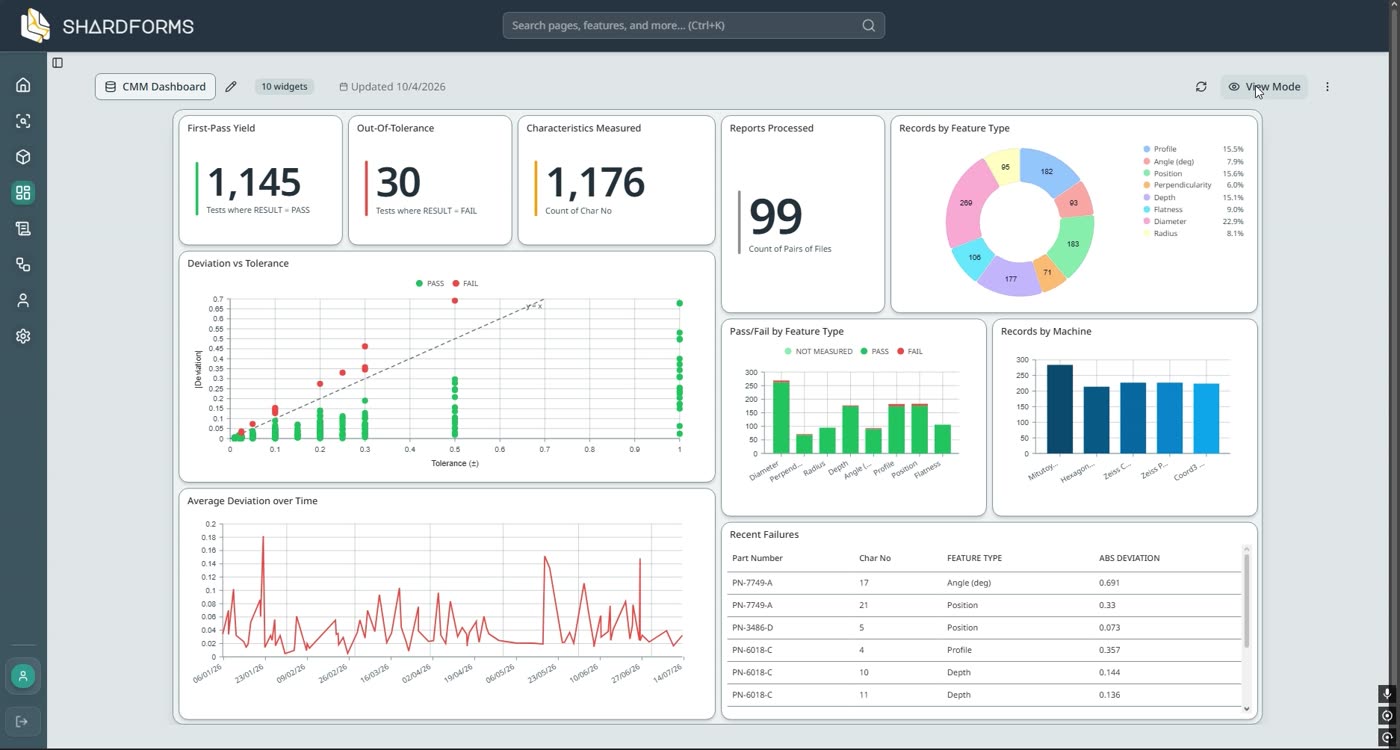
  4. A dashboard with totals, a scatter chart of measured against nominal values, a donut of characteristic types and a line chart of deviation over time.

    One table, any chart

    Every document becomes a row you can filter, export, or chart by supplier, part or month. Prefer Excel or Power BI? Export to CSV, or have it keep an Excel workbook up to date.

It reads the text printed in the PDF, so a typed 0.12 is stored as 0.12, every time. Scanned paper is its weakest case: it works best on digital PDFs and spreadsheet exports.

Sheet6 of 14
SectionWhat, where, who
ForQA, management and IT
Reading timeOne minute

What it does, where it runs, and who looks after it.

Three questions, usually asked by three different people in the same company. Here are the straight answers.

Turns your certificates and reports into rows you can chart.

24-0917
Certificate
24-0917
Goods receipt
LotMoist.Ash
24-09150.120.30
24-09160.130.31
24-09170.110.29

Matched by the lot number on both

Moisture % by lot

It reads the values off paperwork that arrives in the same layouts week after week, pairs the documents that belong together by the number printed on both, and writes one row per lot or part. Your charts read from those rows.

On a PC at your site. Documents and records stay there.

Your PC
Documents Records

Charts and dashboards read from here too

AI set-up draftingIn the cloud, optionalOnly if you ask it to draft a layout from one sample
Licence checkNow and then

One thing always leaves: the software checks its licence with us from time to time, the way Adobe or Microsoft software does, so it isn’t built to run fully offline. If you ask AI to draft a new layout for you, the one sample you choose is read in the cloud. Set layouts up by hand and it never leaves.

Your QA team, or your IT person. No developer.

Certificate of analysis

1Batch No.224-0918 Moisture0.12 % Ash0.31 %
FieldLot no.24-0918

Click the label, then the value.

Kinmoor calls it “Batch No.”, you call it Lot no.

Setting up a layout means clicking a label on the document, then its value. When a supplier changes their template, you adjust that one layout. When the person who set it up leaves, the next person opens the same screens. There’s no macro to decode.

PDF says0.11
Row says0.11

Typed PDFs: it reads exactly what’s printed.

If the certificate says 0.11, the row says 0.11. The same document gives the same row every time. Nothing is guessed: a value it can’t read cleanly is flagged for a person to check.

Scan shows0.11
OCR reads0.1l ?

Scanned pages are the weak spot.

A scan has to be turned into text first, and scanned tables are where mistakes creep in. If most of your paperwork is scanned, send a scan as your sample and see how it does before you commit to anything.

Sheet7 of 14
SectionHow it works
Operations10 – 50
Buttons you press0

The route a certificate takes, from inbox to chart.

Once a layout is set up, every step runs when a file arrives. Here is what happens at each operation, shown on screens from the app.

Op.
Operation
On screen
Op.10

Arrives

Certificates and reports are saved into a folder on the PC ShardForms runs on. Each new file starts the process. Nobody uploads anything.

C:\QA\Incoming
Aldgrove_CoA_240917.pdf08:12
GRN_4512.pdf08:40
KinmoorResins_COA-0918.pdf09:05
7731A_FAI-000231_cmm.csv09:31
Op.20

Identified by its layout

Each file is recognised as a known layout: Aldgrove’s certificate, Kinmoor’s certificate, your own goods receipt. A new supplier is one more layout, set up once.

Identified
Aldgrove_CoA_240917.pdfAldgrove · CoA
GRN_4512.pdfGoods receipt
KinmoorResins_COA-0918.pdfKinmoor · CoA
7731A_FAI-000231_cmm.csvCMM results
Op.30

Matched by the number on both

A certificate waits for the goods receipt with the same lot number. An FAI report waits for the CMM results with the same report number. If the numbers don’t agree, nothing is written, and both stay visible until someone looks.

Matching by lot no.
Lot24-0917Joined
CertificateAldgrove_CoA_240917.pdf
Goods receiptGRN_4512.pdf
Lot24-0971Waiting
CertificateBexleyTan_CoA_0971.pdf
Waiting for a goods receipt with lot 24-0971
Op.40

Read and checked

Values are read from the spots someone clicked when the layout was set up: the label, then the value. Values from both documents can be checked against each other before anything is saved, like a CMM reading against the tolerance on the FAI report.

Kinmoor Resins · CoA layout
CERTIFICATE OF ANALYSIS
Batch No.24-0918 MFI (g/10 min)12.4 Moisture (%)0.12 Ash (%)0.31
Op.50

Written as a row, and charted

One row per lot goes into ShardForms’ built-in database. Charts read straight from it, so the six-month trend is already drawn. Need it in Excel or Power BI? Export to CSV, or have it keep an Excel workbook up to date.

Moisture % · Aldgrove Polymers · last 6 months
Sheet8 of 14
SectionWhen something’s off
Where you see itThe Issues inbox
Every fixLogged

When something’s off, it stops and tells you.

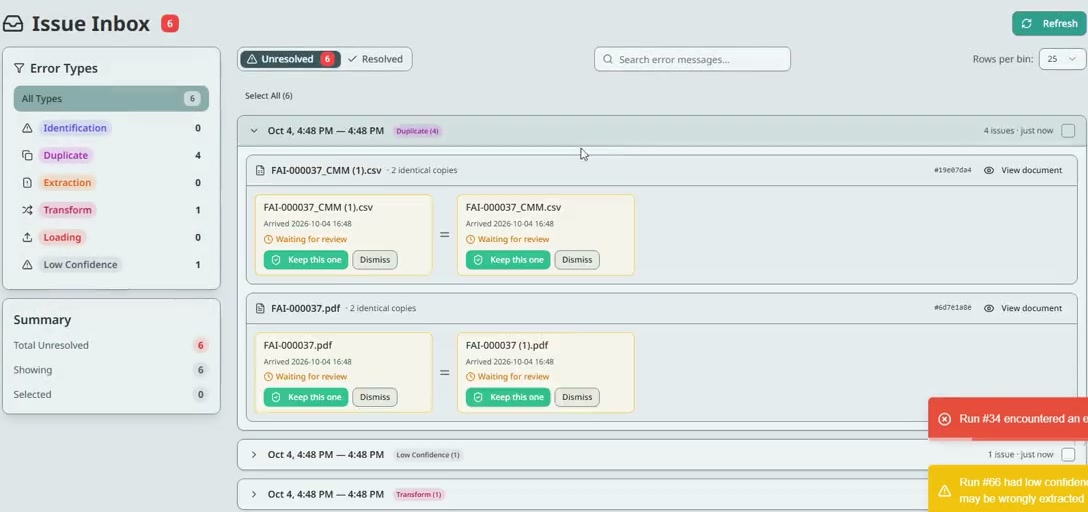
Paperwork is messy. The same certificate arrives twice, a long table pushes a value onto the next page, a cell says “——” where a number belongs. ShardForms doesn’t guess its way past any of it. Every problem goes into one Issues inbox, with the reason and the document beside it.

The Issues inbox in the app. Error types down the left: Identification, Duplicate, Extraction, Transform, Loading, Low confidence. Two duplicate files are shown side by side with Keep this one and Dismiss buttons.
The Issues inbox, from the working app. Two files arrived twice; you keep one copy of each.
  • Duplicate
    The same file, twice.An identical file arriving again is caught. You keep one copy, so nothing is counted twice.
  • Low confidence
    A value that isn’t quite where it should be.It looks for each value at the spot you set, then a little wider. If it only finds it further away, say a long table pushed it onto page 2, the value is saved and listed for someone to check.
  • Extraction
    A value that’s missing, or the wrong shape.A field it can’t find, or one that breaks a rule you set (lot numbers must look like 24-0000), is flagged, never left blank or quietly accepted.
  • Transform
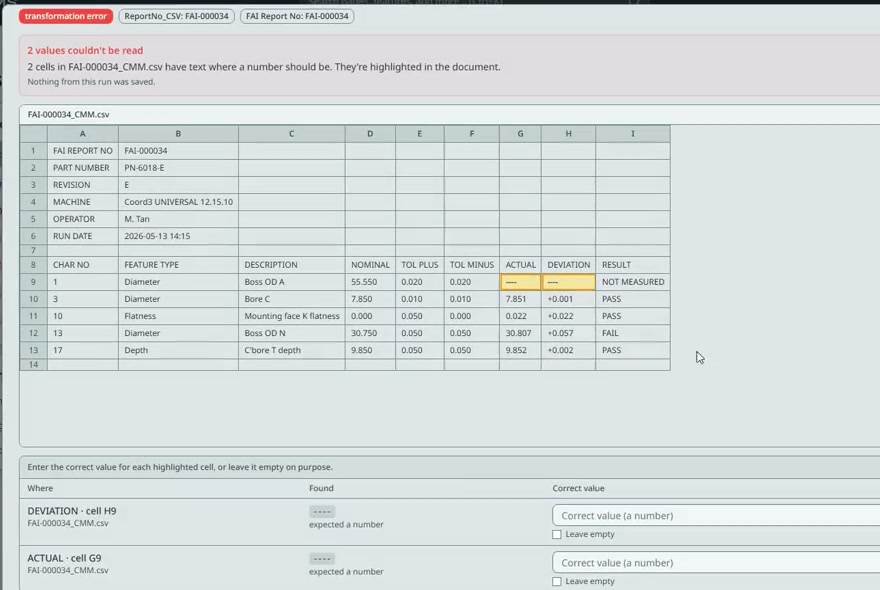
    A calculation that can’t run.A cell reads “——” where a number belongs. Nothing from that document is saved. You see the exact step and the value it found, type the right one, and it runs again.
  • Identification
    A file it doesn’t recognise.A document that doesn’t match any layout you’ve set up waits in the inbox instead of being read as something it isn’t.
A transformation error in the app: two cells in a CMM file have text where a number should be. The cells are highlighted in the document, and below them are boxes to enter the correct value or leave it empty on purpose.
Two cells held “——” instead of numbers. They’re highlighted in the file, with a box for the right value.

Every fix is on record.

When someone confirms a value or types a correct one, ShardForms logs who did it, when, and what the document originally said. When an auditor asks where a number came from, the answer is there.

Small changes don’t need a person.

Supplier documents aren’t perfectly consistent, and one layout can allow for that: a label written differently, a value that’s moved, a field that sometimes has an extra value and sometimes doesn’t. Conversions and pass/fail checks happen in a separate calculation step you can see.

For your IT personDuplicates are found by file hash. Each value is searched for in up to three passes, each less strict; a value found only below the pass you set (by default the second) is marked low confidence. Each run’s steps can be inspected one by one.

Not yet

It doesn’t yet flag results that are out of spec on its own. These checks are about reading the document correctly. To check a result against your tolerance today, add a pass/fail column as a calculation step. Built-in alerts are being built.

Sheet9 of 14
SectionWhere it runs
ForWhoever looks after your IT
Always leavesA licence check

It runs on a PC at your site. Here is exactly what leaves the building.

For whoever looks after your IT: one thing always crosses the line, one only if you choose, and neither is your day-to-day paperwork.

Your documents
Stay on that PC, and so does every record made from them.
Who runs it
Your QA team. Anyone can install it on a Windows PC: download, run the installer, sign in. No IT project, no developer.
Reads
PDFs with selectable text, Excel and CSV exports. Scans work, less reliably.
Keeps records in
Its own built-in PostgreSQL database. Nothing for you to set up or look after.
Gets data out
Keeps an Excel workbook up to date in a folder you choose, and exports records to CSV.
Backups
A full database backup, exported whenever you want.
Today
One PC, Windows. A server install, so your whole team can use it, is being built.
Sheet10 of 14
SectionWhy not an AI tool?
Compared withAI document tools
BasisPrivacy, accuracy, cost

Why not just use one of the AI document tools?

There are hundreds of them now, and for plenty of paperwork they’re a fine choice. For quality records, three things usually rule them out: where your documents go, how the numbers are produced, and what every page costs.

Your documents go to their cloud.

To read a certificate, most AI document tools upload it to the vendor’s servers, and often on to a model provider’s. Plenty of quality teams aren’t comfortable with that for supplier and customer documents, however good the security is.

AI tool: your PDF goes toVendor’s cloudModel provider
ShardForms: your PDF stays onYour PCIts built-in database

ShardForms runs on a PC at your site. Documents and records stay there. No document has to leave: set a layout up by hand, or let AI draft it from one sample you choose.

A model predicts the values.

An AI tool reads a page the way a person skims it: it predicts what each value probably is. It’s usually right. When it isn’t, the wrong number looks exactly as sure as the right ones, and nobody can say why it came out that way.

Printed on the certificate0.11
Read the first time0.11
Read again next month0.11
Smudged valuesent to a person

ShardForms reads the text printed at the spot you pointed to when you set up the layout. The same file gives the same row every time, and a value it can’t read cleanly goes to a person instead of being guessed.

Every page is a paid model call.

An AI tool sends each page to a model, and every call costs money. That cost ends up in the price, usually per page or per document, so the bill grows with your volume.

Certificates this month1,200
Model calls, AI tool1,200
Model calls, ShardForms0

ShardForms reads without a model, so your bill doesn’t grow with your volume. It’s priced by the number of layouts. No surprises in a busy season.

QuestionTypical AI document toolShardForms
Where your documents are readUsually uploaded to the vendor’s cloudOn a PC at your site
How a value is producedPredicted by a model from the pageRead from the spot you pointed to at set-up
The same file, read twiceCan differ if the model or its settings changeGives the same row
A value it can’t read cleanlyMay be filled in with its best guessFlagged for a person to confirm
Two documents that belong togetherUsually read one at a timePaired by the number printed on both. Near-misses are held.
What you pay forUsually per page or per document, since each one is a model callThe number of layouts you run. No per-page charges.
Where AI is usedOn every value, on every pageOnly if you want it: to draft a layout from one sample you choose. A person checks the draft.
Fair to say

AI tools are improving quickly, and they suit one-off documents with no repeating layout. ShardForms is built for the opposite case: the same layouts, again and again, where every number has to stand up in an audit.

Sheet11 of 14
SectionIs it a fit?
DispositionAccept or reject
Inspected byYou

It suits some paperwork very well, and some not at all.

Tick what’s true for you on the left, then check the right. If you land on the right-hand side, we’d rather say so now than after a pilot.

Accept

A good fit when

Tick what’s true for your paperwork.
Reject

Not a fit when

  • Every document is a new layout.It’s built for formats that repeat, not one-offs.
  • The data is already in a database or behind an API.An ordinary data integration tool will serve you better.
  • So few documents that typing them in doesn’t hurt.A spreadsheet is fine at a handful a month.
  • You want to search or summarise documents.It produces rows of values to chart, not answers to questions.
It is not

A place to store documentsIt reads them and moves on.

A search toolYou won’t look documents up in it.

An “ask your data” chatbotIt writes rows and charts.

A replacement for your ERPIt sits beside it.

Concession

Scanned paperwork is its weakest case. It works best on digital PDFs with selectable text, and on spreadsheet files like CMM exports. Scanned tables can be read, but expect more values flagged for checking.

Sheet12 of 14
SectionCompared with tools you know
ComparedKinds of tool, not products
BasisWhat each is built to do

Other tools stop at one end. This covers the stretch in between.

Some tools read documents and hand you a file. Some chart data that’s already in a database. ShardForms starts at the paperwork as it arrives and ends at rows and charts you keep, on your own PC.

Our reading of what each kind of tool is built to do, not a benchmark of any product.

Kind of toolReads paperworkPairs documents by a number on bothEnds in rows and charts you keep
Sheet13 of 14
SectionQuestions
Answered byMasato Tahir, founder
Not answered herehello@shardforms.com

What people ask before they send a document.

If your question isn’t here, email it. You’ll get an answer from the person who built the software, by the end of the week at the latest.

What happens to the document I send you?

We use it to build your demo: your layout, set up in ShardForms, plus copies of the same layout filled with made-up values, so you can watch it read, match and chart a realistic batch.

To build your demo, it’s read by an AI service that drafts the set-up and the sample copies, and I check everything before it’s sent to you. It’s used only for your demo. We keep it on our own machine in Singapore and delete it, with the generated copies, when you ask or 30 days after the demo, whichever comes first.

Choose a document you’re comfortable sharing. Most companies have at least one sample that isn’t sensitive, or you can black out the sensitive values: the layout is what matters.

Does anything leave our building?

Documents and the records made from them stay on the PC ShardForms is installed on. One thing always goes out: the software checks its licence with our server from time to time. And if you ask AI to draft a new layout, the one sample you choose is read in the cloud. Set layouts up by hand and that never happens.

So it isn’t air-gapped, and it isn’t built to run fully offline. If you need that, tell us early.

Will it read scanned documents?

It can, but it’s the weakest case. It works best on digital PDFs with selectable text and on spreadsheet files such as CMM exports. If your paperwork is mostly scanned, send a scan as your sample and judge the result before committing.

A supplier changed their certificate template. What then?

You adjust that supplier’s layout in the same click-the-label, click-the-value screens. The rest keeps running, and the supplier’s new certificates land in the same table and the same charts as before. Earlier versions of the layout are kept, so you can roll back.

We already use Power BI. Do we need your charts?

No, but you can keep using it. Export your records to CSV, or have ShardForms keep an Excel workbook up to date, and point Power BI, Tableau or Excel at that. The built-in charts are there for teams without a BI tool, or for a quick look.

Is it AI?

The reading isn’t. It takes the text printed at the positions you pointed to, so the same file gives the same values every time and nothing is guessed. AI is optional, and only used at set-up: it can draft a layout from one sample you choose, which you then check and edit. You can also set a layout up entirely by hand.

Do we need a developer or a big IT project?

No. Anyone on your team can install it on a Windows PC: download the installer, run it, sign in. After that your QA team runs it: setting up a layout is point and click, and nobody edits code.

Couldn’t we get someone to write a script, or ask ChatGPT to?

For a while, yes. Plenty of companies have one. What a script doesn’t come with: support, updates, a way to handle a supplier’s new template without rewriting it, and screens your own staff can change after the person who wrote it has left.

How is this different from OCR software?

OCR and document-capture tools read a document and hand you the text or a file. ShardForms keeps going: it pairs the documents that belong together, refuses to pair them when the numbers differ, writes one row per lot or part into its database, and charts it.

What does it cost?

The pilot is S$1,500 for four weeks on one document layout, credited in full against your first year if you continue.

After that, it’s priced by the number of document layouts you run through it. The subscription price isn’t fixed yet, so we’ll quote it during the pilot, before you decide.

ShardForms is one person. What if you disappear?

A fair worry. Your records are kept on your own PC, not with us. If your licence ends, for any reason, ShardForms switches to read-only: you can still open everything, export all your records to CSV, and take a full backup of the database. Nothing you’ve built is locked away.

Do we need to change how suppliers send documents?

No. Save them into the folder ShardForms watches, the way you’d save them anywhere else. Suppliers don’t change anything.

Can several people use it?

Today it runs on one Windows PC, which suits a QA team that shares a machine. A server install, so everyone on your network can use it from their own PC, is being built.

What’s still being built?

We’d rather tell you now than have you find out in a pilot. These are being built, in no fixed order:

  • A server install, so everyone on your network can use it from their own PC
  • Documents arriving by email, as well as into a folder
  • Watching a folder on a network share
  • Alerts when a result is out of spec against your tolerances (today you add a pass/fail check as a calculation step)
  • Excel output with linked tables, and direct connections for BI tools
  • Spotting the same lot or report arriving in a different file (today it catches identical files)

If one of these decides it for you, tell us. It helps us choose what comes first.

Masato Tahir

Role
Founder. Builds the software, and your demo.
Based in
Singapore
Email
hello@shardforms.com
Company
ShardForms on LinkedIn

ShardForms is one person, in Singapore. When you email, I’m the one who replies, by the end of the week at the latest, and I’m the one who builds your demo.

I’m a polytechnic graduate, and I built ShardForms myself: the part that reads documents, the part that matches them by lot or report number, and the charts at the end. There’s no sales team between you and the person who can change how it works.

Being small has an obvious risk, so I’d rather answer it plainly: your records live on your own PC, and if your licence ever ends, the app turns read-only so you can still export everything.

Sheet14 of 14
SectionNext step
You sendOne document
You getA working demo, usually within a week

Send us one document you’re tired of retyping.

  1. 1
    Send one certificate.Email it to hello@shardforms.com, or reply to the email you got from us.
  2. 2
    Get a working demo, usually within a week.Built on your own layout, with a realistic batch read, matched and charted.
  3. 3
    If it does what you need, start the four-week pilot.If it doesn’t, you’ve spent one email finding out.

Away 22 Oct to 5 Nov. Documents sent in that time get their demo the weekend of 7–8 Nov.

Pilot termsRev A
S$1,500credited in full against your first year
Length
Four weeks
Scope
One document layout
Runs on
One Windows PC at your site
Set-up
Download, install, sign in. Help by email.
After the pilot
Priced by number of layouts
Starts
Once the invoice is paid